How it is set up
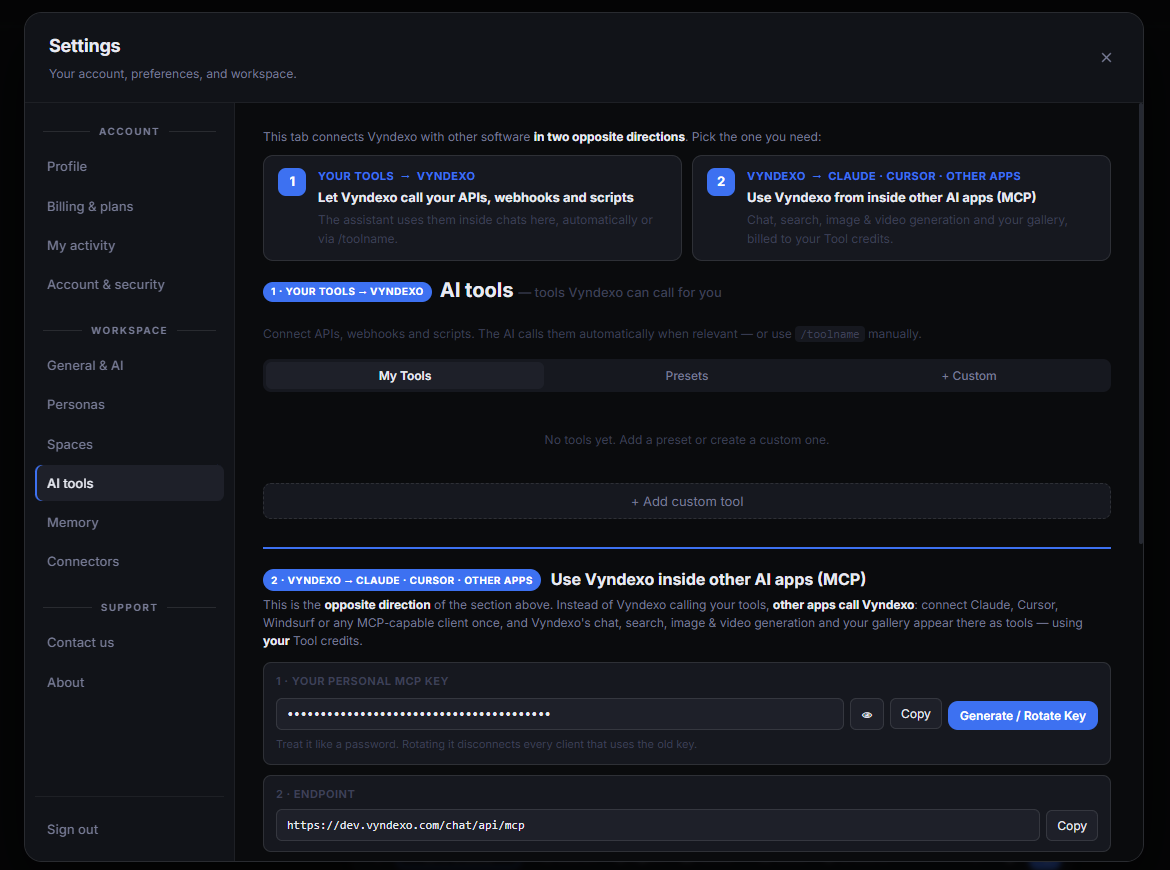
Everything lives on one settings tab. The top half is direction 1: under My Tools you add a preset or a custom tool — an API, a webhook or a script — and from then on Vyndexo can call it. The bottom half is direction 2: your personal MCP key and the endpoint you paste into Claude, Cursor or another client. After that, those apps can start a Vyndexo chat, search the web, generate images and videos in the Media Studio and read your gallery — all charged to your own Tool credits.
Direction 1 · your tools in Vyndexo
Connect APIs, webhooks and scripts. The AI calls them automatically when relevant — or you call one yourself with /toolname. Add from presets or build a custom tool.
Direction 2 · Vyndexo in other apps
Generate your personal MCP key, copy the endpoint, add both to an MCP‑capable client. Vyndexo’s chat, search, image & video generation and gallery then show up as tools in that app.
Good to know
Treat the MCP key like a password; rotating it disconnects every client that uses the old key. Work done through MCP is billed to your Tool credits, the same as doing it in the workspace. More tool types will follow — for now it is MCP only.
Frequently asked
What does "MCP in two directions" mean?
Direction 1: under My Tools you add an API, a webhook or a script, and Vyndexo can call it inside chats. Direction 2: your personal MCP key and endpoint let Claude, Cursor or another client use Vyndexo.
What can other apps do through Vyndexo's MCP endpoint?
Start a Vyndexo chat, search the web, generate images and videos in the Media Studio and reach your gallery — billed to your Tool credits.
How do I trigger my own tools in a chat?
The assistant uses them automatically when relevant, or when you type /toolname.