
Describe the outcome and the boundaries
A useful agent brief explains the deliverable, the input files and the limits of the task. For example, ask for a source-linked research note, a script that processes a supplied dataset, or a document prepared to a particular structure.
State which actions are permitted, which systems are in scope and what requires your review. Access to a tool should not be treated as permission to send a message, change a production service or expose a private file.
Use Agent mode deliberately
- Choose Agent in the workspace. Keep a simple question in normal chat; choose Agent when the task needs several connected actions.
- Provide a clear brief. Include the intended output, the relevant files and any constraints on data, systems or publication.
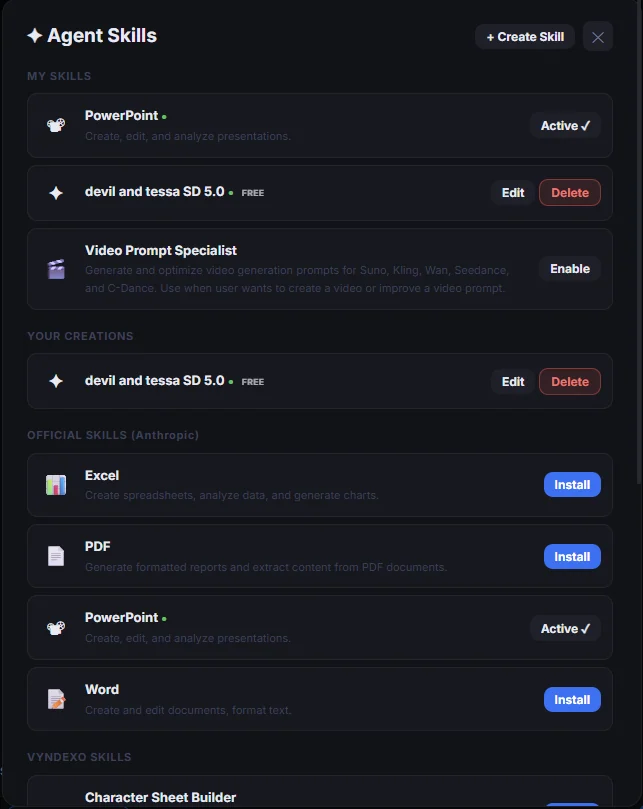
- Apply a relevant skill. Reusable skills can provide instructions for document, coding or creative workflows. Choose the skills that match the task.
- Review the result. Inspect files, sources and code before using them for important decisions or running them against a live environment.
Keep execution separate from automation
Agent mode helps complete a task now. Scheduled Tasks are a separate workflow for prompts that should run on a timetable. Headquarters is a beta visual workflow builder with its own availability and access conditions.
Tool connections and MCP can extend supported workflows, but require the appropriate configuration and permissions. Agent output still needs review: a successful tool call does not by itself prove that the result is accurate or suitable for production.
Questions about AI agent
How is Agent different from normal AI chat?
Normal chat focuses on a conversational response. Agent mode is intended for tasks that use several supported actions, such as working with code, research and files, before returning a result.
Can I reuse instructions for a type of task?
Vyndexo Skills provide reusable instructions and capabilities for repeatable agent workflows. Availability depends on the skills and tools configured in the workspace.
Does an agent task automatically run every day?
No. Running a task in Agent mode is distinct from creating a Scheduled Task. Use the scheduling workflow when you want recurring execution.
Should I review generated code and documents?
Yes. Check code, important claims, sources and output files before relying on them. Use clear action boundaries for tasks that interact with live systems or private information.
Bring the work into your workspace.
Check the current model options, review the relevant credits and start with a focused project. Keep the results and the context for the next step.
Open VyndexoExplore all features